The title, summary and keywords appear without asking. Only spaces, and turning keywords into tags, wait for you.
AI suggestions
When you save something, your AI provider writes a title, a summary and keywords for it, and suggests spaces.
- Setting
- Suggest as you capture
- Needs
- A provider and a model
- On
- Mac, iPhone, iPad
What you get
Turn on Suggest as you capture in Settings → AI, on Mac or on iPhone and iPad. Connecting your first provider turns it on for you. Each new capture then gets:
- A title, used only when the capture has no title of its own. Your own title always wins.
- A summary, usually a few bullets.
- Keywords, up to five. They show and are searchable, but they aren't tags unless you add them.
- Spaces, up to two of the spaces you already have. Nothing is filed until you pick one.
- A price, for shop pages.
Where they show
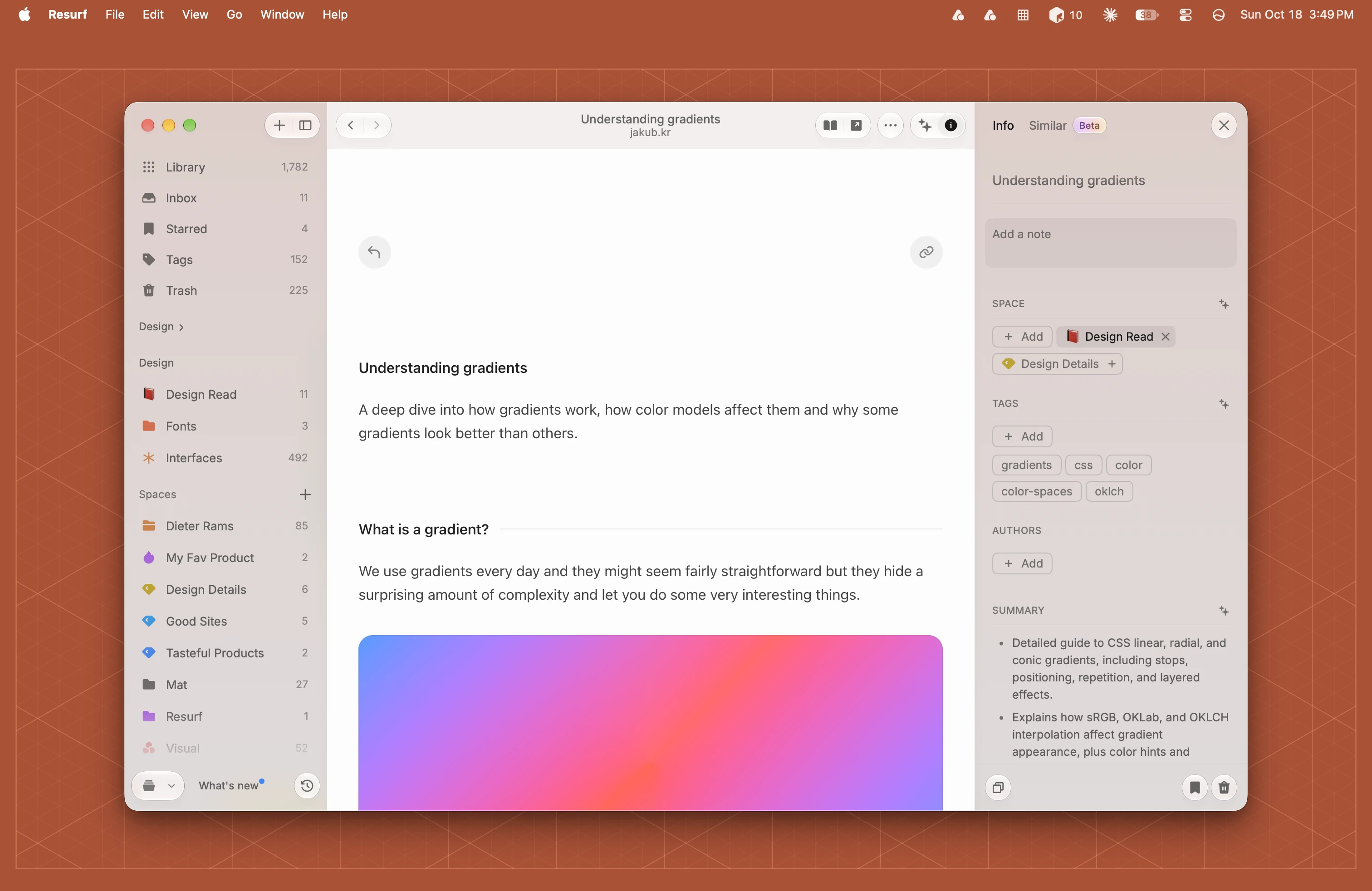
Open a capture's inspector.
A capture with no title of its own goes by the AI title, marked with a sparkle. Click it to edit, and press Return to keep it as your own.
If the capture has a title, start editing it. The AI title appears as a pill below; click it to use it.
Suggested spaces sit after your own under Space, as outline chips. Click one to file the capture there.
AI keywords show under your tags, without a #. The summary is in the Summary section.
Open a capture's info sheet.
AI keywords lists the keywords. Tap Add keywords to tags to make them tags.
AI summary shows the summary.
Tap Space. Suggested spaces are in the Suggested section.
Missing or failed suggestions
Suggestions are written once, for new captures. Turning them on doesn't go back over older ones.
In the inspector, the line under Tags says what happened, for example Couldn't get keywords or AI isn't set up.
Click Retry, or Generate keywords if it never ran.
For several captures, select them, open the menu in the bottom bar that counts your selection, and choose Generate AI suggestions.
For your whole library, use Reprocess library… in Settings → AI.
In the capture's info sheet, the AI suggestions row shows its state. Tap Generate or Retry.
Or open the capture, tap More, then Suggest tags and summary.
For older items, tap Generate missing suggestions in Settings → AI. It covers items saved on this device and leaves existing suggestions as they are.
Questions
Why does my capture have a title I didn't type?
It had no title of its own, so the AI title stands in. Type your own title to replace it.
It says AI isn't set up, but I connected a provider.
Check that AI features and Suggest as you capture are on in Settings → AI, and that a model is picked.